
RERA Index Calculator (Dubai) | 2026 Complete Guide
Are you worried about a rent increase at renewal? If yes, then this guide is for you. Many tenants feel confused. They do not know what is allowed and what is not. However, this tool gives you a clear answer. It compares your rent with the market rate. Then it shows if an increase is allowed.
The RERA Index Calculator helps you determine whether your rent can increase. It is the easiest way to check your rent against the official market rate in Dubai. Now, let’s make it even simpler. This guide explains everything step by step. You will learn how the calculator works. You will also learn the rules, examples, and tips. Let’s begin.
What the RERA Index Calculator Actually Does
The RERA Index Calculator is an official tool. It helps tenants and landlords. It shows if rent can increase at renewal. First, it checks your current rent. Then, it compares it with similar homes in your area. After that, it gives a result. This result shows the rent range. It also shows if an increase is allowed.
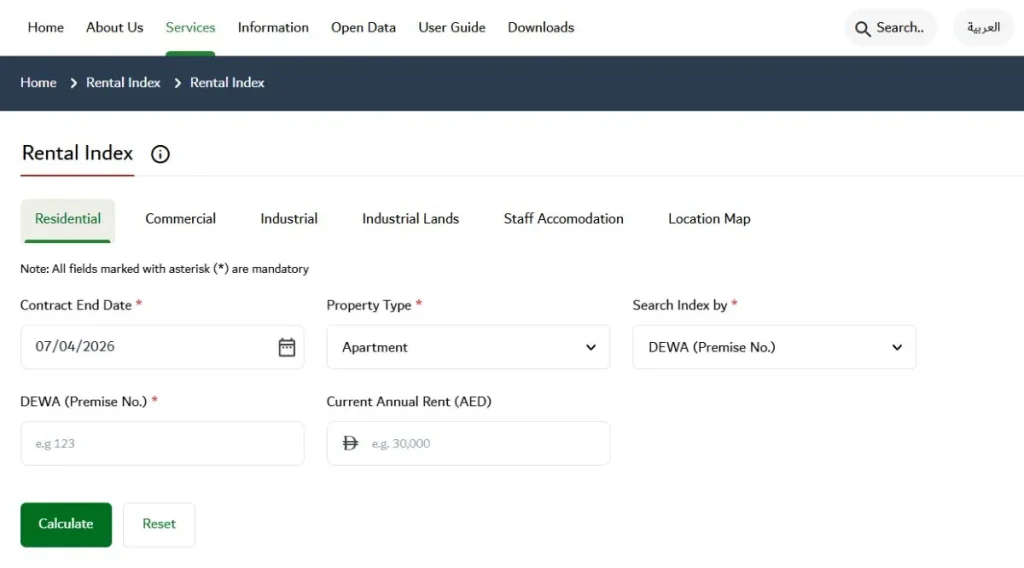
In addition, the calculator needs some details. For example, you must enter the property type. You also need bedrooms and a location. Then, you add your current rent. After that, you submit the form. The result will appear quickly. So, it is easy to use. Also, it removes confusion. Therefore, both tenants and landlords can trust it.
Pro Tip: Check the RERA Index Calculator 100–120 days before your lease renewal. If a rent increase is indicated, you’ll have enough time to compare nearby properties, negotiate with your landlord, or plan your next move. Always save a screenshot or PDF of the result and keep it with your renewal communications for future reference.
How to Use the RERA Rental Index Calculator
Using the RERA Index Calculator is simple. Following these simple steps helps you plan and avoid last-minute surprises at renewal.
Step 1: Open the official service
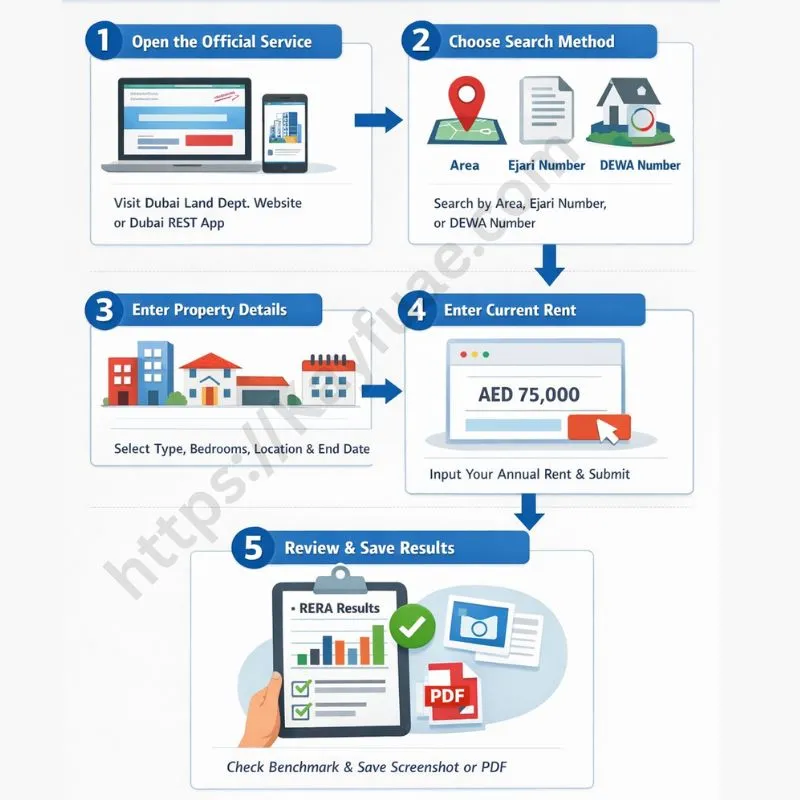
Go to the Dubai Land Department website or open the Dubai REST app to access the “Inquiry about the Rental Index” tool.
Step 2: Choose a search method
You can search by Area, Ejari contract number, or DEWA premise number, depending on what information you have.
Step 3: Enter property details
Select your property category (residential, commercial, or villa), type (apartment or villa), number of bedrooms, community/area, and your contract end date.
Step 4: Enter current rent
Enter your current annual rent in AED, then submit the form to check your rent status.
Step 5: Review and save results
The calculator will show the benchmark rent range and whether a rent increase is allowed under RERA brackets. Always save a screenshot or PDF for your records.
RERA Rent Increase Brackets
The RERA Index Calculator Dubai uses fixed brackets to limit how much rent can go up. These brackets depend on how far your rent is below the market benchmark.
- 0% increase: if your current rent is up to 10% below the benchmark, no increase is allowed. This means your rent is already close to the market rate.
- 5% increase: if your rent is 11–20% below the benchmark, your landlord can raise it to 5%.
- 10% increase: if your rent is 21–30% below the benchmark, a 10% increase is allowed.
- 15% increase – if your rent is 31–40% below the benchmark, the maximum increase is 15%.
- 20% increase – if your rent is more than 40% below the benchmark, the landlord can increase it up to 20%.
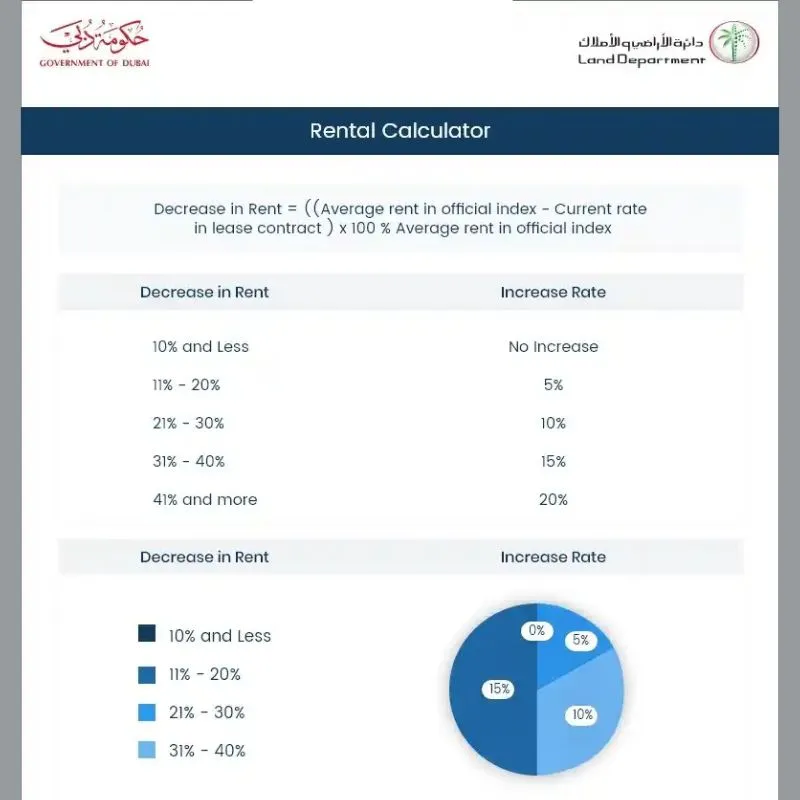
These brackets make it easy to see if your rent is fair. Tenants can check the RERA Index Calculator to know their exact bracket
RERA Index Calculator Dubai: Practical Examples
The RERA Index Calculator gives clear examples of how rent changes work. These examples show how the calculator works in real life. The results are based on your contract date and current rent. It also considers the 90-day notice. You can see exactly how much your rent can increase.
| Property Type & Location | Current Rent (AED) | Benchmark Range (AED) | Gap vs. Midpoint | Indicative RERA Increase |
|---|---|---|---|---|
| 1-Bed Apartment, Dubai Marina | 80,000 | 85,000 – 95,000 | ~12% below | Up to 5% |
| 2-Bed Apartment, JVC | 65,000 | 70,000 – 78,000 | ~10–17% below | 0–5% |
| 3-Bed Villa, Mirdif | 145,000 | 150,000 – 170,000 | ~3–14% below | 0–5% |
| Studio Apartment, Business Bay | 50,000 | 52,000 – 58,000 | ~8–14% below | 0–5% |
| 4-Bed Villa, Arabian Ranches | 210,000 | 220,000 – 250,000 | ~8–16% below | 0–5% |
These examples help you understand the system before renewal. Using real numbers makes it easier to plan your budget and negotiate with the landlord.
RERA Notice and Timing Rules That Matter
- Any rent increase requires 90 days’ written notice from the landlord.
- If notice is not given 90 days before the lease ends, no increase applies.
- The calculator reflects the benchmark, but your final rent depends on the timing of the notice.
- Always check the index at the time of renewal, because benchmarks can change over time.
- Keep copies of notices and screenshots of the RERA Index Calculator.
- Even if your rent is below the benchmark, a late notice cancels the increase.
- Tenants can use saved evidence to dispute any unfair increase at the Rental Dispute Settlement Centre.
Special Cases & Quick Fixes
- If your property is new or not listed, try searching in the wider area.
- If your bedroom count does not match, choose the closest option, like studio vs 1-bed.
- If your result shows 0% increase but rent seems low, you may already be in the benchmark range.
- If a landlord’s offer exceeds the cap, respond in writing with calculator results and cap table.
- Escalate disputes to the Rental Dispute Settlement Centre if unresolved.
- Always keep a copy of all correspondence for your records.
- These fixes help tenants protect their rights, and landlords stay within the rules.
Practical Case Study
- Fatima rents a 2-bedroom apartment in JLT for AED 95,000.
- The RERA Index Calculator shows the benchmark is AED 100,000–112,000.
- Her rent is about 10.4% below the midpoint.
- With a valid 90-day notice, the allowed increase is up to 5%.
- If notice came late, her rent cannot increase at renewal.
- This shows how timing and the bracket determine the final rent.
- Tenants can use this method to calculate and plan their budget.
Tips for Tenants and Landlords for Fair Negotiation
- Use the calculator result and note the bracket your rent falls into.
- Consider total costs: rent, parking, chiller, and maintenance.
- Offer a longer lease term to negotiate smaller yearly increases.
- Keep all communication in writing for proof.
- Attach a calculator screenshot in emails or messages.
- Tenants can show evidence if a landlord asks for more than allowed.
- Landlords can follow rules and avoid disputes by using the calculator results.
FAQs
Conclusion
The RERA Index Calculator helps you understand rent changes at renewal. Using it early saves stress and protects your rights. The calculator compares your rent to the official benchmark and shows the allowed increase. Always check the calculator, keep a record, and use the results for negotiation. It is simple, free, and accurate.