FAB Balance Check 2026: (Ratibi card) Guide
In today’s fast-moving digital era, banking no longer requires long queues or branch visits, and First Abu Dhabi Bank (FAB) makes financial management simple and accessible. With multiple FAB balance check options available in 2026, customers can easily track their Ratibi card, salary account, or prepaid card balance anytime. From basic balance enquiries to secure digital banking tools, FAB continues to offer smart and reliable solutions designed for everyday financial needs.
Whether you want to check your FAB balance online, through mobile app, SMS, ATM, or other official channels, FAB provides flexible services that put control in your hands. No matter where you are or which device you use, FAB ensures a smooth and secure banking experience whenever you need it.
FAB Balance check Through the PPC Inquiry System
The PPC Inquiry System is one of the most commonly used options for checking FAB balance, especially for salary card and Ratibi card holders in the UAE. This method is designed for users who receive their salary on prepaid or payroll cards and may not use full online banking services. It allows customers to check their balance online without downloading any app or visiting a bank branch. Many employees prefer this option because it is simple, fast, and accessible from any device with internet access.
Who Can Use the PPC Inquiry System
- FAB salary card holders
- Ratibi card users
- Prepaid card customers
Steps to Check Balance Using PPC Inquiry
- Open the official FAB PPC Inquiry portal
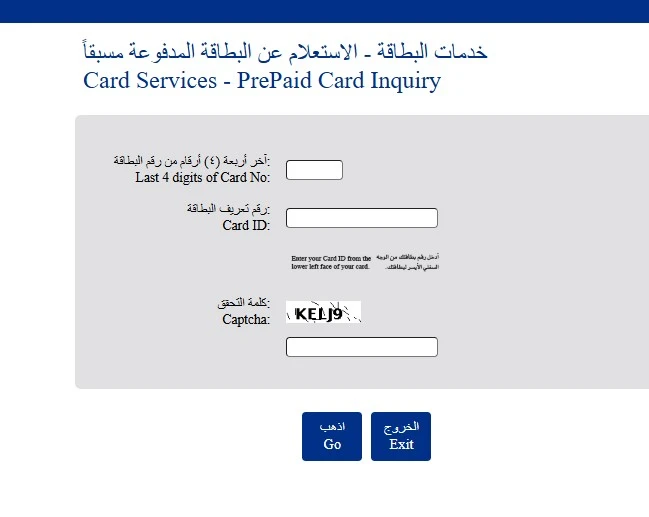
- Select your card type
- Enter your card last four digits and required personal details
- Complete the captcha
- View your available balance on the screen
Important Things to Know
- Works mainly for salary and prepaid cards
- Internet connection is required
- Does not provide full account access
Using the FAB Mobile App to Check Account Balance
The FAB mobile app is the most convenient and widely used method for checking account balance in 2026. It allows customers to access real-time balance information, recent transactions, and other banking services from their smartphone. The app is designed with a user-friendly interface, making it suitable even for first-time users. With the FAB mobile app, customers can manage their finances anytime without visiting an ATM or branch.
Requirements for Using the FAB App
- Registered FAB account
- Active UAE mobile number
- Internet connection
Steps to Check Balance in FAB Mobile App
- Install Fab mobile app in your phone
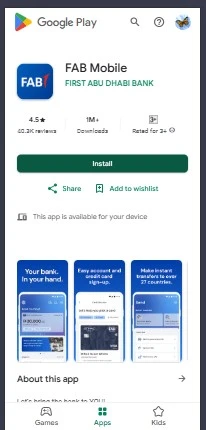
- Sign up your account and login
- After sign in open the FAB mobile app
- Select your account from the dashboard
- View your available and ledger balance
Additional App Features
- Transaction history
- Fund transfers
- Bill payments
- Statement downloads
Checking FAB Salary Account Balance by SMS
SMS balance checking is a useful option for FAB customers who do not have internet access or smartphones. This service allows users to receive their account balance through a simple text message sent to their registered mobile number. It is commonly used by salary account holders who need quick balance updates. SMS banking works on all mobile phones and is reliable, but the mobile number must be registered with FAB.
SMS Banking Requirements
- Registered UAE mobile number
- Active FAB account
Steps to Check Balance via SMS
- Open your phone’s messaging app
- Send massage “BAL” with last four digits of your account to 2121
- Receive your balance details via SMS
Things to Remember
- SMS charges may apply
- Only limited account information is shown
Checking FAB Balance Through Phone Banking
Phone banking is a reliable method for customers who prefer voice-based services instead of mobile apps or online banking. FAB provides phone banking through an automated IVR system and customer service representatives. This option is ideal for senior citizens and non-tech users. It is also useful in situations where internet access is not available.
When Phone Banking Is Useful
- Non-smartphone users
- Elderly customers
- Emergency balance checks
Steps to Check Balance via Phone Banking
- Call the official FAB customer care number
- Select the balance enquiry option
- Enter required verification details
- Listen to your account balance
Security Tip
Never share your PIN or OTP with anyone over the phone.
Checking FAB Balance Using Online Banking
FAB online banking allows customers to check their balance through a secure web portal using a computer or mobile browser. This method is suitable for users who prefer managing their finances on a larger screen. Online banking provides detailed account information, including balances and transaction history. Customers must register for online banking before using this service.
Requirements for Online Banking
- FAB online banking registration
- Username and password
Steps to Check Balance Online
- Visit the official FAB online banking website
- Log in securely
- Open the account summary section
- View your balance and recent transactions
Safety Tips
- Avoid using public computers
- Always log out after use
Using ATMs to Check FAB Account Balance
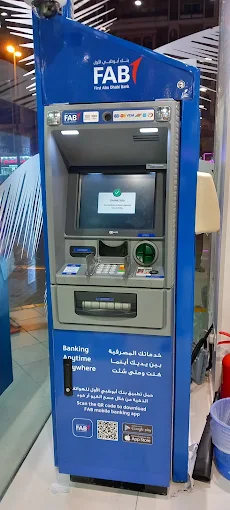
ATM balance inquiry is a traditional and reliable method that does not require internet access. FAB customers can check their account balance using their debit card and PIN at FAB ATMs across the UAE. Some other bank ATMs may also support balance inquiries, though extra charges may apply.
What You Need
- FAB debit card
- ATM PIN
Steps to Check Balance at an ATM
- Insert your debit card
- Enter your PIN
- Select “Balance Inquiry”
- View your balance on the screen
Additional Notes
- Non-FAB ATMs may charge a fee
- No receipt is required
Checking FAB Balance at a Bank Branch
Visiting a FAB branch is suitable for customers who prefer face-to-face assistance or need official confirmation of their balance. This option is helpful when digital methods are not working or when account issues exist. A bank representative can provide accurate balance information after verifying your identity.
When to Visit a Branch
- Account restrictions
- Verification or KYC issues
- Printed confirmation required

Steps to Check Balance at Branch
- Visit the nearest FAB branch
- Take a customer service token
- Present your Emirates ID
- Request a balance enquiry
Required Documents
- Emirates ID
- Debit card or account number
Checking FAB Balance Through Payit Wallet
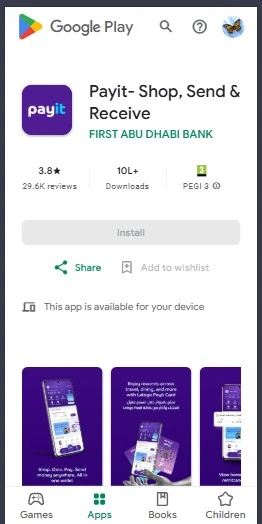
Payit is a digital wallet powered by FAB that allows customers to manage payments and check linked account balances. It is popular among users who prefer mobile wallet solutions for daily transactions. Once your FAB account is linked to Payit, you can easily view your balance from the app dashboard.
What Is Payit Wallet
A mobile wallet that connects with FAB accounts for easy balance viewing and payments.
Steps to Check Balance Using Payit
- Download the Payit app
- Register or log in
- Link your FAB bank account
- Click wallet button on screen
- View your balance on the dashboard
Benefits of Payit
- Quick access
- Simple interface
- Useful for everyday spending
Using FAB AI Virtual Assistant for Balance Check
FAB’s AI Virtual Assistant is a digital tool designed to help customers with basic banking queries, including balance checks. It is available 24/7 and provides instant responses without waiting for a customer care agent. This option is ideal for users who prefer chat-based support.
What the AI Assistant Can Do
- Provide balance information
- Answer basic account questions
Steps to Check Balance via AI Assistant
- Open FAB website or mobile app
- Start a chat with the AI assistant
- Complete verification
- Request balance details
Why Use This Method
- Available anytime
- No waiting time
Learning FAB Balance Check Through Video Guides
Video guides are helpful for customers who prefer visual explanations over text. FAB provides official tutorials that show how to check balance using different methods. These guides are especially useful for new customers and first-time app users.
Why Checking FAB Balance Regularly Is Important
Regular balance checking helps customers stay informed about their financial situation. It allows you to track salary credits, expenses, and pending transactions. Frequent balance checks also help detect unauthorized activity early. Maintaining awareness of your balance helps avoid penalties and failed payments.
Financial Control
Helps manage daily and monthly expenses.
Account Security
Early detection of suspicious transactions.
Avoiding Charges
Ensures minimum balance requirements are met.
Common FAB Balance Check Issues and Solutions
Although FAB balance checking is generally smooth, users may sometimes face technical or account-related problems. These issues can include app errors, delayed updates, or SMS failures. Understanding common problems and their solutions helps save time.
App or Website Not Working
Solution: Update the app or try again later.
Balance Not Updated
Solution: Check available vs ledger balance.
SMS Not Received
Solution: Confirm your mobile number is registered.
Understanding First Abu Dhabi Bank (FAB)
First Abu Dhabi Bank is the largest bank in the UAE, offering services to individuals, businesses, and government entities. It is known for its strong digital banking systems and wide branch network. Millions of customers trust FAB for salary accounts, savings, loans, and payments.
Background of FAB
Formed after a major bank merger in the UAE.
FAB Services
Retail, corporate, and digital banking.
Why FAB Is Trusted
Strong security and innovation.
Types of Accounts Offered by FAB
FAB provides different account types to meet the needs of various customers. Each account has specific features and balance requirements. Choosing the right account helps manage finances efficiently.
Savings Accounts
For personal savings and interest earnings.
Salary Accounts
Designed for employees receiving monthly salary.
Business Accounts
For companies and entrepreneurs.
Minimum Balance Rules for FAB Accounts
Minimum balance requirements vary depending on the account type. Salary accounts often have relaxed conditions, while savings accounts usually require a monthly average balance. Understanding these rules helps avoid unnecessary charges.
Salary Accounts
Usually zero-balance.
Savings Accounts
Monthly balance requirement applies.
How to Avoid Fees
Maintain required balance or choose the right account.
Understanding the FAB SWIFT Code
The FAB SWIFT code is “NBADAEAAXXX” for international money transfers. It identifies FAB in the global banking network and ensures smooth processing of overseas payments.
Purpose of SWIFT Code
Used for international transfers.
When You Need It
Sending or receiving money from abroad.
Where to Find It
FAB website, statements, or customer support.
Opening a FAB Bank Account
Opening a FAB bank account is simple and accessible for UAE residents. FAB offers both online and branch-based account opening options. The process usually takes a short time once documents are submitted.
Eligibility
Valid Emirates ID and residency.
Required Documents
Passport, visa, Emirates ID.
Processing Time
Usually quick.
Opening a FAB Account Through Mobile App
FAB allows customers to open an account digitally through the mobile app. This option saves time and avoids branch visits.
Steps to Open Account via App
- Download the FAB app
- If you are a new Signup your account
- After sign in select option “Open Account”
- Verify Your Identity
- Scan Emirates ID
- Enter your registered Mobile number, email, and employment status.
- Monthly salary (minimum AED 3,000), Employer name and contact (for verification).
- Choose Account Type
- Upload your documents
- After uploading the documents you receive confirmation SMS or email
Downloading FAB Bank Statement Using Mobile App
Bank statements are required for many official and personal purposes. FAB allows easy statement downloads through the mobile app.
Steps to Download Statement
- Log in to your FAB app
- Select your account
- Choose date range 3 months, 6 months, 1 year
- And generate PDF and Download the PDF
Common Uses
Loans, visas, expense tracking.
Getting a Salary Certificate from FAB
A salary certificate is an official document that confirms your income. It is often required for loans and rentals.
What Is a Salary Certificate
Proof of income issued by FAB.
How to Request
- Open your fab mobile app
- Find documents tab and click “Salary Certificate“
- Select your salary account
- Generate Certificate
Processing Time
It will take 1–3 working days.
FAQs
What is the Fab swift code?
Fab swift code is NBADAEAAXXX
What is the Fab helpline number?
For UAE citizens FAB customers use 600 52 5500 and for foreigners use +971 2 6811511.
Can I Check FAB Balance Without Internet?
Yes, using SMS, ATM, or phone banking.
Is FAB Balance Check Free?
Most methods are free; some may have charges.
Which Method Is Best?
The FAB mobile app is the most convenient.
Conclusion
Keeping track of your finances is easy when you know the right FAB balance check methods. First Abu Dhabi Bank offers multiple options, including mobile app, SMS, PPC inquiry, ATM, phone banking, online banking, and branch visits, ensuring every customer can access their FAB account balance conveniently.
Whether you prefer digital tools or offline services, FAB provides secure and user-friendly solutions for all account types. Regular balance checks help you manage expenses, confirm salary credits, avoid unnecessary charges, and maintain account security. By choosing the method that suits your lifestyle, you can stay in full control of your FAB account anytime, anywhere.
Information Source:
Ppc magnati website for ppc inquiry
https://ppc.magnati.com/ppc-inquiry
https://www.bankfab.com/en-ae/v1/personal/prepaid-cards/ratibi